Mining on Android with Termux
Most Termux mining guides walk you through installing a toolchain and compiling XMRig — slow, RAM-hungry, and it often fails halfway. Here's the shorter path: one command installs a prebuilt, ARM-native miner and you're hashing Monero or Verus in a couple of minutes. No root, no compiler.
1 · Why this way
cmake, no compiling. It's a single ~593 KB ARM-native binary with the hot loops written directly in ARM NEON and AArch64 assembly, and it mines four algorithms — Monero (RandomX), Verus (VerusHash), Litecoin+Dogecoin (scrypt), and Bitcoin (SHA256d) — not just one. XMRig is great software; this is simply the faster, more reliable path on a phone in Termux. It's free and open source (GPL-3.0).
2 · Install Termux
Install Termux — a free Linux terminal for Android — from F-Droid or GitHub. Don't use the Google Play build: it's frozen at an old version and its package mirrors no longer update, which breaks the install. No root is required.
3 · Install the miner (one line)
Update Termux's packages, then run the installer:
The installer detects Termux, downloads the native ARM64 build, verifies its SHA-256, installs the two runtime libraries (libcurl, libjansson) with pkg, and puts primo-arm-miner on your PATH. Prefer to do it by hand? Grab the Termux tarball from the downloads section.
4 · Start mining
Monero (RandomX) — the classic CPU coin
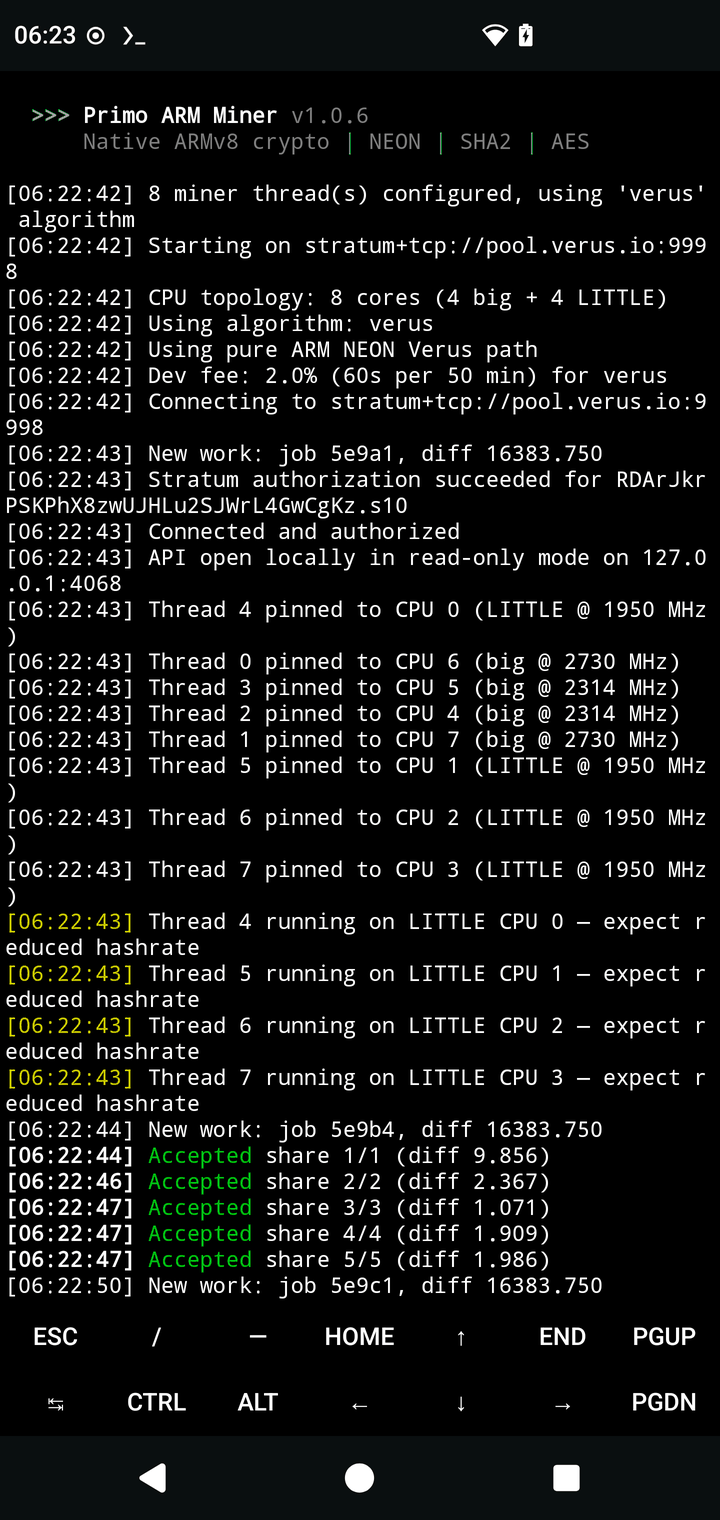
Verus (VerusHash) — the phone-friendly CPU coin
Swap in your own wallet address. Within a minute you'll see Accepted lines. Threads, big/LITTLE core pinning and per-core tuning are auto-detected — no flags needed. Stop with Ctrl-C. Other coins: -a scrypt (LTC+DOGE) or -a sha256d (Bitcoin).
5 · Keep it running at full speed
top-app group, so a backgrounded miner slows down or stalls.
Three ways to handle it, best first:
- Run from an SSH or
adb shellsession — those stay in the unthrottledtop-appcpuset even with the screen off. This is the full-speed path. (Termux's ownsshdmakes this easy from a laptop on the same Wi-Fi.) - Run
termux-wake-lockfirst — it stops Android from suspending the process, so mining keeps going with the screen off (though still at the throttled background clocks). - Use the Primo Android APK instead — it runs as a foreground service and keeps the screen on, sidestepping the terminal entirely.
6 · A note on Monero & RAM
RandomX (Monero) is memory-hard. Primo builds a shared ~2.1 GiB dataset for full-speed fast mode (~700 H/s on a modern phone). If your phone can't spare that much free RAM, the miner automatically falls back to light mode — a 256 MiB cache instead of the dataset — which is about 5× slower (~160 H/s) but works on almost anything.
You can force light mode (e.g. to keep RAM free) by launching with PRIMO_RANDOMX_LIGHT=1 primo-arm-miner -a randomx …. Verus, scrypt and SHA256d have no such memory requirement.
7 · Troubleshooting
CANNOT LINK EXECUTABLE … libcurl.so— an outdated Termux package set. Runpkg update && pkg upgrade -yagain, then retry.- "refuses to start / no crypto extensions" — the CPU lacks ARMv8 AES/PMULL/SHA2. Any 64-bit phone from the last decade has them; a 32-bit OS does not. Primo is ARM64-only by design.
- Mining stops when you lock the phone — that's the throttling in section 5; use
termux-wake-lockor an SSH session. - Antivirus / Play Protect flags it — mining binaries are widely flagged by heuristic; the source is public and the build is reproducible. See the FAQ.
8 · What to expect
On a typical modern phone you'll see roughly ~700 H/s on Monero, ~7.5 MH/s on Verus (8 threads), or ~90 MH/s on Bitcoin's SHA256d. Earnings on Monero or Verus are small but real — think cents per day. Bitcoin earns effectively zero (it's a benchmark and a lottery). No hype: a phone is a hobby miner, and that's the fun of it.